

Planet Python
Last update: October 10, 2024 01:43 PM UTC
October 10, 2024
PyCharm
How I do Django APIs in PyCharm
I learn so much from watching conference talks, especially live, when I’m vibing with the crowd. But sometimes I watch and think: “Wow, I wish I could show you how awesome that would be in PyCharm.”
That just happened. Here’s the explainer, with a little special something at the end.
Hello, DjangoConf
I recently attended DjangoConf 2024 which kicked off this year’s DSF-PyCharm fundraiser. I attended Felipe’s DRF tutorial where he showed off using PyCharm and even a little bit about endpoints.
Afterwards, I ran into a PyCharm fan who told me what he really likes when using PyCharm for Django. It matched what I really like. Hence, a blog post.
The end is the point
My superfan friend was an early adopter of endpoints, our feature for rethinking the API developer experience (DX) in Django, FastAPI, and Flask. Me too. It’s cool to have a listing of endpoints, jumping to the definition, and most of all – issuing an HTTP request right there in the IDE. No going out to Postman.
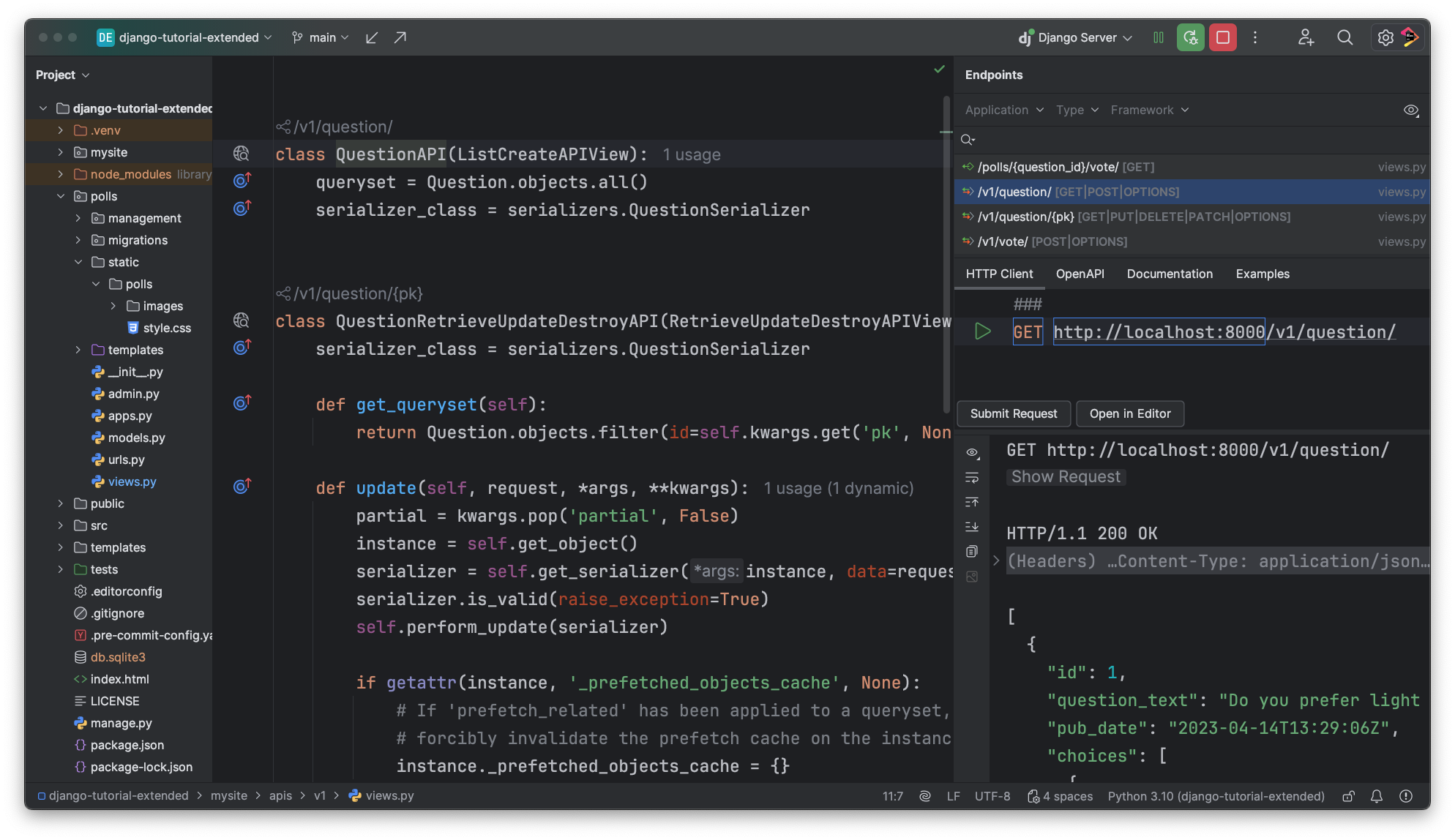
I covered endpoints and the HTTP client in my previous blog post. One extra point: he said Postman pricing is going up. I guess I should talk more about the HTTP Client.
Always be debugging
Most folks know that I’m a debugger stan, probably because I just won’t shut up about it. It turns out that he also uses the debugger first, meaning he runs the Django server, under the debugger, all the time, even when he isn’t debugging.
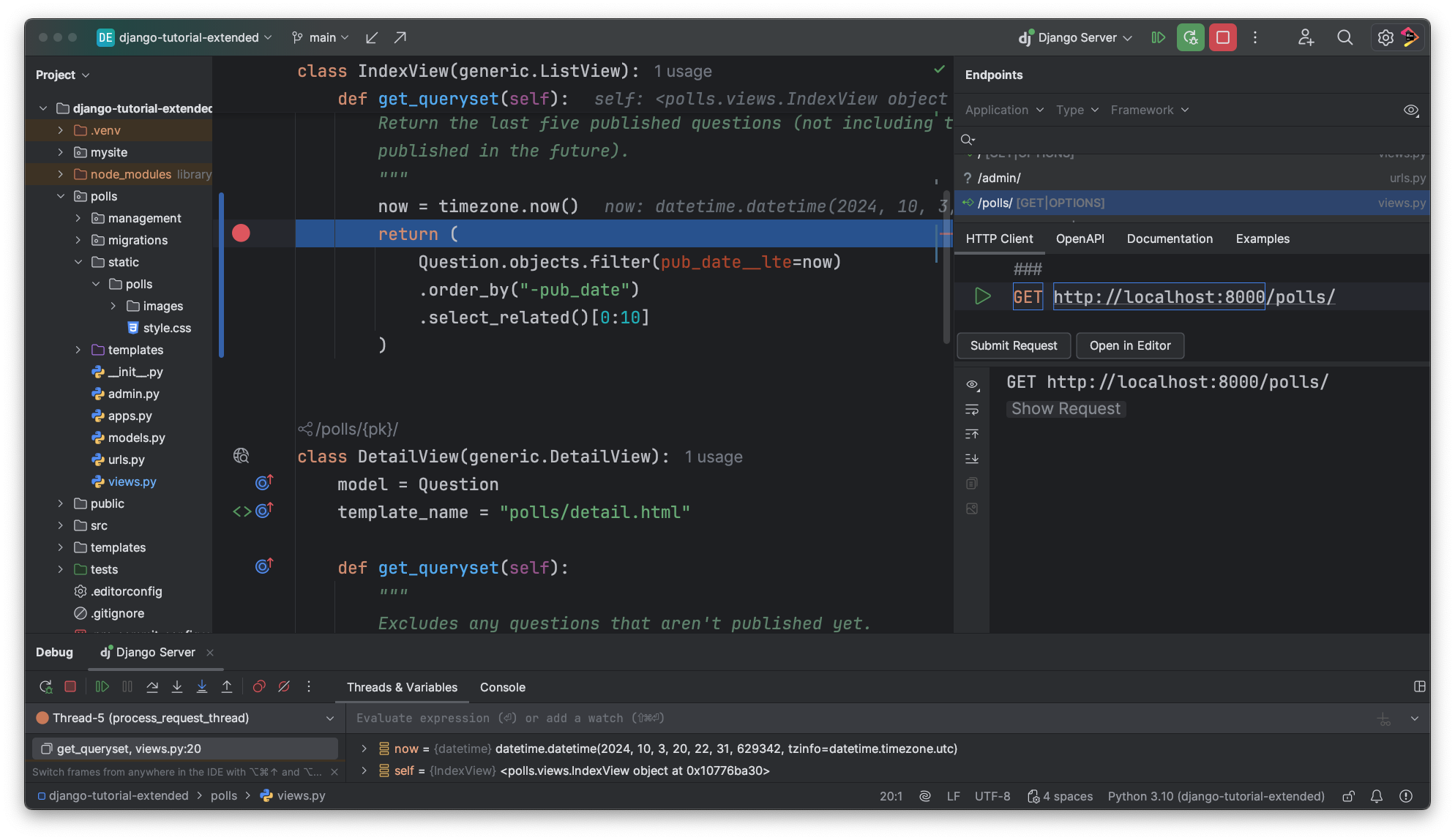
Why? First, it’s so fast, you don’t notice the speed hit. As he also knew, Python 3.12 lowers the impact of debugging and PyCharm uses this automatically. The bigger point though: when you want to poke around, you don’t need to stop the regular “run”, launch under “debug”, then return to “run.” That’s disruptive, so people just do print. Which makes me a sad panda.
If you’re always debugging, then poking around is already RIGHT THERE. Even if you don’t have a bug and just want to investigate. Even if you are in a template.
This is great with endpoints, as you can click a breakpoint in your code and issue a request without leaving the tool.
He made one last point – PyCharm’s Django support and debugger is more mature and polished. We’ve been doing this for a while!
I didn’t know there would be a test
There’s one more step to the higher-zen of using PyCharm to the fullest with Django. Why use the browser or an HTTP client at all? Why not just sit in a test module and let PyCharm + pytest bring joy to your world? In fact – don’t even run Django. No server process, less hassle.
Django makes it really easy to issue fake requests in a test, get the results back, and make sure things are cool. I like having my code on the left, my test on the right, and the test output on the bottom. In fact, I also like combining Always Be Testing with Always Be Debugging, which makes it crazy-easy to stop in the middle of a view and see what’s going on.
I like it so much, here’s a little video:
This works great for how code works. You can skip going to the browser, reloading, and poking around. You stay in the IDE, the flow. But there’s a catch.
Seeing is believing
Sometimes you need to see how the page looks. In the browser. With your eyeballs. Any chance PyCharm can improve the DX for this?
As it turns out, in 2023.3 we shipped Django Preview, a feature-rich browser in the IDE that keeps up as you type.
A love letter to Django
This concludes my speaking from the heart about my way of doing Django API development in PyCharm: endpoints, debugger, testing, and preview.
But I’d like to close by speaking from the heart about Django, leading with an odd little twist of fate about Django killing my project.
October 09, 2024
Real Python
Build a Contact Book App With Python, Textual, and SQLite
Building projects is a great way to learn programming and have fun at the same time. When you work on a project, you apply different coding skills simultaneously, which is good practice for what you’ll do in a real-life project. In this tutorial, you’ll create a contact book application with a text-based interface (TUI) based on Python and Textual. To store the contact data, your app will use an SQLite database.
In this tutorial, you’ll learn how to:
- Create the contact book app’s TUI using Textual
- Handle the database operations using SQLite
- Connect the app’s TUI with the database code and make it functional
At the end of this project, you’ll have a functional contact book application that will allow you to store and manage your contact information.
To get the complete source code for the application and the code for every step in this tutorial, click the link below:
Get Your Code: Click here to download the free sample code you’ll use to build a contact book app with Python, Textual, and SQLite.
Demo: A Contact Book Built With Python and Textual
Contact or address books are a widely used type of application. They can be found on phones and computers, allowing users to store and manage contact information for family, friends, coworkers, and so on.
In this tutorial, you’ll code a contact book TUI app with Python, Textual, and SQLite. Here’s a demo of how your contact book will look once you’ve followed all the steps:
Your contact book will provide a basic set of features for this type of application, and you’ll be able to display, add, and remove the information in your contacts list.
Project Overview
To build your contact book app, you’ll organize the code in a few modules under a package. In this tutorial, you’ll use the following directory structure:
rpcontacts_project/
│
├── rpcontacts/
│   ├── __init__.py
│   ├── __main__.py
│   ├── database.py
│   ├── rpcontacts.tcss
│   └── tui.py
│
├── README.md
└── requirements.txt
The root directory of your project is rpcontacts_project/. Inside, there’s an rpcontacts/ subdirectory that holds the application’s main package.
You’ll cover the content of each file in this tutorial. The name of each file will give you an idea of its role in the application.
For example, __main__.py will host the application, and database.py will provide database-related code. Similarly, rpcontacts.tcss is a CSS file that will allow you to tweak the visual style of your Textual app. Finally, tui.py will contain the code to generate the app’s TUI, including the main screen and a couple of auxiliary screens or dialogs.
Prerequisites
To get the most out of this project, you should have some previous knowledge of how to lay out a Python project and work with SQLite databases. You should also know the basics of working with Python classes. Some knowledge about writing CSS code would also be a plus.
To satisfy these knowledge requirements, you can take a look at the following resources:
- Python Application Layouts: A Reference
- Introduction to Python SQL Libraries
- Data Management With Python, SQLite, and SQLAlchemy
- HTML and CSS for Python Developers
Don’t worry if you don’t have all of the prerequisite knowledge before starting this tutorial—that’s completely okay! You’ll learn through the process of getting your hands dirty as you build the project. If you get stuck, then take some time to review the resources linked above. Then, get back to the code.
The contact book application you’ll build in this tutorial has a single external dependency, which is Textual. This library provides a rapid application development framework that allows you to create apps you can run in your terminal and browser.
To follow best practices in your development process, you can start by creating a virtual environment and then install Textual using pip:
Read the full article at https://realpython.com/contact-book-python-textual/ »
[ Improve Your Python With 🐍 Python Tricks 💌 – Get a short & sweet Python Trick delivered to your inbox every couple of days. >> Click here to learn more and see examples ]
Stefanie Molin
Mind Your Image Metadata
Most devices record a variety of metadata when generating images. While some of that information *may* be innocuous, you could end up exposing the GPS coordinates to your home if you aren't careful. In this article, I provide a brief introduction to image metadata, and then show you how to remove it with `exif-stripper`.
PyCharm
Where To Get Data for Your Data Science Projects
Whether you’re starting a new project or expanding an existing one, as a data scientist, you’re always on the lookout for new material to explore. Knowing where to get data for data science projects can be challenging, and finding “good data” can be even more difficult. In this article, we’ll look at what makes “good data”, what format that data might be in, where to find it, and what the next steps are.
What is “good data” for data science projects?
Firstly, we should consider how relevant the dataset is to our work. You can stumble upon lots of datasets that overlap with your work in some way, but it can be difficult to decide which is the best one for you to put your effort into. In this scenario, we’ll briefly explore some of the attributes of the data.
To start with, how consistent is the dataset? Specifically, are there any missing values? Data might be missing for a variety of acceptable reasons, but it can also be a sign of selection bias or other factors that might skew your results. Often, we can choose to either accept missing data or delete the records that contain it before we do our analysis, but knowing about missing data early in the process can help you make an informed decision to use that dataset or not.
Along with missing data, it’s worth checking to see if any of the data is duplicated. Duplicated data might be fine, but it might also signify a lack of consistency that could skew your results. Duplicated data might also reduce your confidence in the dataset as a whole, so it’s important to consider when choosing your dataset.
Another aspect to consider for good data is timeliness. The time over which the data was gathered is usually pertinent to the questions you want to answer when you start analyzing it. Checking if the data was collected in the timespan that you’re interested in and considering the continuity of that timespan is helpful.
When you’re starting your journey into data science and picking your first few datasets to play with, you don’t need to worry about picking the perfect dataset – focus on the process and exploring instead. When you’re ready to learn more about datasets and how to avoid common pitfalls, I recommend you watch this talk from Dr. Jodie Burchell – Garbage data in, garbage models out.
Do you want structured or unstructured data?
Structured data is what you’ll find in a table where each row is an observation, and each column is a variable or field. By contrast, unstructured data usually needs to be pre-processed before you can work with it in a data science project, or it can be used by specialist models that can process it internally. Examples of unstructured data include text, images, and sound.
As you might have guessed, unstructured data is used more in advanced and specialized subfields in data science, like natural language processing and computer vision. Most data scientists start with, and continue working with, structured data for many of their projects. I recommend that this is where you start, too.
I recommend you keep the notion of structured and unstructured data in mind as we explore standard data formats.
What are standard data formats?
In addition to the quality of the data, we also have to choose between available data formats. You’ll come across two broad types of data formats as a data scientist: downloadable data (often CSV) and databases.
Downloadable data is nearly always structured data and often takes the form of comma-separated value (CSV) files. These downloads are available from various online repositories. They are among some of the most prolific and most accessible sources of data. If you’re new to data exploration, this is the best place to get started, as they’re easy to find, human-readable, and easy to work with without any extra steps.
If you’re ready to enter the world of databases, it’s worth understanding that they are further subdivided into relational (SQL) and non-relational (non-SQL) databases. As a broad rule, relational databases contain structured data and non-relational databases contain non-structured data, but determining whether data is structured is not an exact science. Instead, think of non-relational databases as being adaptable to the shape of the data they are storing.
Databases are commonly used in the following cases: when you have large datasets, when multiple people need to access and modify the data simultaneously, when datasets need to be able to scale, and when data is unstructured (non-SQL only). In addition, if you’re commissioned to do data analysis for your company, you may find that you’re given a database to work with as it’s already in-house.
PyCharm Professional has excellent support for SQL and non-SQL databases. If your work involves using various databases and writing SQL queries, you can check out our webinar on Visual SQL Development with PyCharm to get more information about the functionality. Alternatively, you can learn how to explore tables without writing a single line of SQL with PyCharm and import your dataset into PyCharm and explore it.
Try PyCharm Professional for free
Where can I find datasets for my data science projects?
Once you’re ready to find out how to get data, there are plenty of resources you can download to use for your data science project. This is not an endless list, but it’s a good place to start and a natural progression for your data science journey.
UCI Machine Learning Repository
The UCI Machine Learning Repository has over 600 datasets covering a host of exciting topics for you to explore, such as biology, health, physics, and climate. UCI datasets also have a diverse set of data types, including images, sequential, and time series. I recommend looking at a few different datasets and types of data if you’re new to data science, as it will help you expand your understanding of what data often looks like.
Kaggle
Another well-known website for datasets is Kaggle. Not only can you sign up to Kaggle to download datasets for data science projects, but it also has a large community of like-minded people who run company-sponsored competitions designed to help you develop your data science skills. If you’re looking for a famous dataset that you’ve seen used in numerous examples, you’ll almost certainly find it hosted on Kaggle.
Hugging Face
Hugging Face is another resource that is rich in datasets. You can filter the results by modalities, including audio, geospatial, and video, and provide a range for the size of your dataset, which can be particularly helpful when you want to start small. Hugging Face has many natural language and computer vision datasets, so you might want to head over there once you’re past the basics and interested in more specialized fields.
Many more
There are many more places that you can go on your data science journey to find fun datasets to explore. You can check out GitHub for curated open source datasets, FiveThirtyEight for datasets relating to American politics and sports, and lastly, one of my favorites, the UK government, to get datasets relating to public services and the economy in the UK.
What are the next steps?
Congratulations! You’ve gained a better understanding of what “good data” is, and you know where to look to find datasets for data science projects. Once you’ve chosen a dataset, you’re ready to start preparing and analyzing your data.
Remember, you can use Jupyter notebooks inside PyCharm to explore both file format and database datasets.
You can read or watch a video showing just some of the ways you can use Jupyter notebooks inside PyCharm to boost your productivity on your data science journey with your chosen dataset.
Try PyCharm Professional for free
Talk Python to Me
#480: Ahoy, Narwhals are bridging the data science APIs
If you work in data science, you definitely know about data frame libraries. Pandas is certainly the most popular, but there are others such as cuDF, Modin, Polars, Dask, and more. They are all similar but definitely not the same APIs and Polars is quite different. But here's the problem. If you want to write a library that is for users of more than one of these data frame frameworks, how do you do that? Or if you want to leave open the possibility of changing yours after the app is built, same problem. That's the problem that Narwhals solves. We have Marco Gorelli on the show to tell us all about it.<br/> <br/> <strong>Episode sponsors</strong><br/> <br/> <a href='https://talkpython.fm/workos'>WorkOS</a><br> <a href='https://talkpython.fm/training'>Talk Python Courses</a><br/> <br/> <strong>Links from the show</strong><br/> <br/> <div><b>Marco Gorelli</b>: <a href="https://fosstodon.org/@marcogorelli" target="_blank" >@marcogorelli</a><br/> <b>Marco on LinkedIn</b>: <a href="https://www.linkedin.com/in/marcogorelli/?featured_on=talkpython" target="_blank" >linkedin.com</a><br/> <b>Narwhals</b>: <a href="https://narwhals-dev.github.io/narwhals/?featured_on=talkpython" target="_blank" >github.io</a><br/> <b>Narwhals on Github</b>: <a href="https://github.com/narwhals-dev/narwhals?featured_on=talkpython" target="_blank" >github.com</a><br/> <br/> <b>DuckDB</b>: <a href="https://duckdb.org?featured_on=talkpython" target="_blank" >duckdb.org</a><br/> <b>Ibis</b>: <a href="https://ibis-project.org?featured_on=talkpython" target="_blank" >ibis-project.org</a><br/> <b>modin</b>: <a href="https://modin.readthedocs.io/en/stable/?featured_on=talkpython" target="_blank" >readthedocs.io</a><br/> <b>Pandas and Beyond with Wes McKinney</b>: <a href="https://talkpython.fm/episodes/show/462/pandas-and-beyond-with-wes-mckinney" target="_blank" >talkpython.fm</a><br/> <b>Polars: A Lightning-fast DataFrame for Python</b>: <a href="https://talkpython.fm/episodes/show/402/polars-a-lightning-fast-dataframe-for-python-updated-audio" target="_blank" >talkpython.fm</a><br/> <b>Polars</b>: <a href="https://pola.rs?featured_on=talkpython" target="_blank" >pola.rs</a><br/> <b>Pandas</b>: <a href="https://pandas.pydata.org?featured_on=talkpython" target="_blank" >pandas.pydata.org</a><br/> <b>Watch this episode on YouTube</b>: <a href="https://www.youtube.com/watch?v=FSH7BZ0tuE0" target="_blank" >youtube.com</a><br/> <b>Episode transcripts</b>: <a href="https://talkpython.fm/episodes/transcript/480/ahoy-narwhals-are-bridging-the-data-science-apis" target="_blank" >talkpython.fm</a><br/> <br/> <b>--- Stay in touch with us ---</b><br/> <b>Subscribe to us on YouTube</b>: <a href="https://talkpython.fm/youtube" target="_blank" >youtube.com</a><br/> <b>Follow Talk Python on Mastodon</b>: <a href="https://fosstodon.org/web/@talkpython" target="_blank" ><i class="fa-brands fa-mastodon"></i>talkpython</a><br/> <b>Follow Michael on Mastodon</b>: <a href="https://fosstodon.org/web/@mkennedy" target="_blank" ><i class="fa-brands fa-mastodon"></i>mkennedy</a><br/></div>
Django Weblog
Why Django supports the Open Source Pledge
We at the Django Software Foundation are pleased to share that Sentry, alongside other partners, has launched the Open Source Pledge — an initiative designed to address sustainability challenges in open source.
The Open Source Pledge is a commitment for member companies to pay OSS maintainers meaningfully for their work. When maintainers are adequately supported, they can better sustain their projects, ensuring the growth, stability, and security of the broader ecosystem.
The sustainability challenge in the Django community
In our community and OSS at large, the challenge is real and significant. Django packages are often maintained by small teams or even individuals, often unpaid. As the demands on these projects grow, so too does the pressure on the maintainers. And without financial support, maintainers often move on without a clear succession plan. The potential failure of these projects not only impacts the developers involved but also the thousands of companies and millions of users who rely on these critical pieces of infrastructure.
Here are a few assorted examples from Django packages in the top 10 by download counts:
- Is DRF still considered alive?, Moving REST framework forward
- Lots of open PRs with no feedback or action
- Recruiting maintainers
- We need more roadies in jazzband
The case for joining the pledge
The Open Source Pledge is simple but impactful: member companies commit a minimum of $2,000 per year, per developer on staff, to support open source maintainers. Additionally, companies are encouraged to publish an annual report detailing their payments, creating transparency and accountability within the community.
We encourage companies of all sizes to join the Pledge and contribute to the sustainability of the software we all depend on. By making a financial commitment, you are not just supporting maintainers—you are investing in the stability, security, and growth of the entire tech ecosystem.
If you're interested in joining the Open Source Pledge or learning more about the sustainability issues facing OSS, please visit the initiative’s page. Together, we can build a stronger, more sustainable open source future. And if you believe in this cause, we encourage you to share this post to help broaden awareness and inspire further commitments from peers and partners.
October 08, 2024
PyCoder’s Weekly
Issue #650 (Oct. 8, 2024)
#650 – OCTOBER 8, 2024
View in Browser »

Differences Between Python’s Mutable and Immutable Types
In this video course, you’ll learn how Python mutable and immutable data types work internally and how you can take advantage of mutability or immutability to power your code.
REAL PYTHON course
DuckDB in the Browser With Pyodide
Learn how to run DuckDB in an in-browser Python environment to enable simple querying on remote files, interactive documentation, and easy to use training materials.
ALEX MONAHAN
Speech-to-Text With Django

Looking to add new functionality to your Django app? Learn how to integrate Speech-to-Text and build a working app that transcribes audio files—with 100+ free hours to get started →
ASSEMBLY AI sponsor
Free Threaded Python With Asyncio
This post talks about combining the new experimental free threading feature of Python 3.13 with Asyncio.
CHANGS.CO.UK • Shared by Jamie Chang
Articles & Tutorials
Switching From virtualenvwrapper to direnv
Earlier this week Trey considered whether to switch from virtualenvwrapper to using local .venv managed by direnv. He then also started experimenting with uv and Starship. This post explains why and his new configuration.
TREY HUNNER
Ensuring a Block Is Overridden in a Django Template
Some template blocks are meant to be overloaded and forgetting to do so results in rendering bugs. This post talks about creating a new tag that throws an exception which alerts your tests if you forget to overload.
TOM CARRICK
Build Your Own AI Assistant with Edge AI
Simplify workloads and elevate customer service. Build customized AI assistants that respond to voice prompts with powerful language and comprehension capabilities - all based on your unique needs with Intel’s OpenVINO toolkit.
INTEL CORPORATION sponsor
Arrange, Act, and Assert Pattern in Testing
Learn what the Arrange, Act, and Assert (AAA) pattern is, how it works, the benefits it offers, and its role in unit test automation. Note: sample code is not in Python, but the concepts apply to all unit testing.
ANTONELLO ZANINI
How I Prepare a Technical Talk
This article outlines the system that Rodrigo uses to prepare his Python talks. Steal his ideas and suggestions so that you, too, can start giving talks at your local meetups and at PyCons all over the world.
MATHSPP.COM • Shared by Rodrigo
Implementing a Python Singleton With Decorators
A singleton pattern is one where only one instance of an object type is allowed at a time. One way to implement this concept is through the use of a decorator. This post teaches you how.
PIETER CLAERHOUT
PEP 759: External Wheel Hosting
This Python Enhancement Proposal specifies a mechanism by which projects hosted on pypi.org can safely host wheel artifacts on external sites other than PyPI.
PYTHON.ORG
Let’s Go Easy on PyPI, OK?
The use of containers can mean a lot of calls to PyPI. This post talks about caching properly to reduce the load on our shared community servers.
MICHAEL KENNEDY
Rotating Turn Order With deque
If you need to cycle through values, one way to do that is with deque. This post shows you through an example service for a game engine.
JUHA-MATTI SANTALA
Python 3.13: JIT and GIL Went Up the Hill
All you need to know about the latest Python release’s changes to the Global Interpreter Lock and Just-in-Time compilation.
DREW SILCOCK
A Dinosaur Learns poetry
“Not a real dinosaur and not real poetry.” This post is about Paul changing how what tools he uses for his Python setup.
PAUL COCHRANE
Projects & Code
pytest-xflaky: A Flaky-Test Hunter Plugin
GITHUB.COM/TESORIO • Shared by Caio Ariede
Events
Weekly Real Python Office Hours Q&A (Virtual)
October 9, 2024
REALPYTHON.COM
PyCon Uganda 2024
October 9 to October 14, 2024
PYCON.ORG
PyCon NL 2024
October 10 to October 11, 2024
PYCON.ORG
Python Atlanta
October 10 to October 11, 2024
MEETUP.COM
DFW Pythoneers 2nd Saturday Teaching Meeting
October 12, 2024
MEETUP.COM
PyCon MEA & Data Science 2024
October 14 to October 16, 2024
GLOBALDEVSLAM.COM
Python Brasil 2024
October 16 to October 21, 2024
PYTHONBRASIL.ORG.BR
PyCon Panamá 2024
October 16 to October 19, 2024
PYCON.PA
Swiss Python Summit 2024
October 17 to October 19, 2024
PYTHON-SUMMIT.CH
Happy Pythoning!
This was PyCoder’s Weekly Issue #650.
View in Browser »
[ Subscribe to 🐍 PyCoder’s Weekly 💌 – Get the best Python news, articles, and tutorials delivered to your inbox once a week >> Click here to learn more ]
Real Python
What's New in Python 3.13
Python 3.13 was published on October 7, 2024. This new version is a major step forward for the language, although several of the biggest changes are happening under the hood and won’t be immediately visible to you.
In a sense, Python 3.13 is laying the groundwork for some future improvements, especially to the language’s performance. As you watch the course, you’ll learn more about the background for this and dive into some new features that are fully available now.
In this video course, you’ll learn about some of the improvements in the new version, including:
- Improvements made to the interactive interpreter (REPL)
- Clearer error messages that can help you fix common mistakes
- Advancements done in removing the global interpreter lock (GIL) and making Python free-threaded
- The implementation of an experimental Just-In-Time (JIT) compiler
- A host of minor upgrades to Python’s static type system
In this video course, you’ll explore these changes and see how this new version of Python can work for you.
If you want to try any of the examples in this video course, then you’ll need to use Python 3.13. The Python 3 Installation & Setup Guide and How Can You Install a Pre-Release Version of Python? walk you through several options for adding a new version of Python to your system.
[ Improve Your Python With 🐍 Python Tricks 💌 – Get a short & sweet Python Trick delivered to your inbox every couple of days. >> Click here to learn more and see examples ]
Quiz: Python Closures: Common Use Cases and Examples
In this quiz, you’ll test your understanding of Python closures. Closures are a common feature in functional programming languages and are particularly popular in Python because they allow you to create function-based decorators.
Take this quiz after reading our Python Closures: Common Use Cases and Examples tutorial.
[ Improve Your Python With 🐍 Python Tricks 💌 – Get a short & sweet Python Trick delivered to your inbox every couple of days. >> Click here to learn more and see examples ]
Django Weblog
Django bugfix release issued: 5.1.2
Today we've issued the 5.1.2 bugfix release.
The release package and checksums are available from our downloads page, as well as from the Python Package Index. The PGP key ID used for this release is Natalia Bidart: 2EE82A8D9470983E.
Python Software Foundation
Join the Python Developers Survey 2024: Share your experience!
This year we are conducting the eighth iteration of the official Python Developers Survey. The goal is to capture the current state of the language and the ecosystem around it. By comparing the results with last year’s, we can identify and share with everyone the hottest trends in the Python community and the key insights into it.
We encourage you to contribute to our community’s knowledge by sharing your experience and perspective. Your participation is valued! The survey should only take you about 10-15 minutes to complete.

Contribute to the Python Developers Survey 2024!
This year we aim to reach even more of our community and ensure accurate global representation by highlighting our localization efforts:
- The survey is translated into Spanish, Portuguese, Chinese, Korean, Japanese, German, French and Russian. It has been translated in years past, as well, but we plan to be louder about the translations available this year!
- To assist individuals in promoting the survey and encouraging their local communities and professional networks we have created a Promotion Kit with images and social media posts translated into a variety of languages. We hope this promotion kit empowers folks to spread the invitation to respond to the survey within their local communities.
- We’d love it if you’d share one or more of the posts below to your social media or any community accounts you manage, as well as share the information in discords, mailing lists, or chats you participate in.
- If you would like to help out with translations you see are missing, please request edit access to the doc and share what language you will be translating to. Translation into languages the survey may not be translated to is also welcome.
- If you have ideas about what else we can do to get the word out and encourage a diversity of responses, please comment on the corresponding Discuss thread.
The survey is organized in partnership between the Python Software Foundation and JetBrains. After the survey is over, we will publish the aggregated results and randomly choose 20 winners (among those who complete the survey in its entirety), who will each receive a $100 Amazon Gift Card or a local equivalent.
Mariatta
Perks of Being a Python Core Developer
Things you can get/do as a Python core developer
I’ve been a Python core developer since January 27, 2017.
Being a Python core developer comes with perks, privileges, and also responsibilities.
Sometimes I can’t tell whether something is a perk, or a privilege, or a responsibility. I think depends on who
you’re talking to, they might see it as an optional nice thing they could get/do, but the same thing might be seen
as burden responsibility to others.
Julien Tayon
Bidirectionnal python/tk by talking to tk interpreter back and forth
Last time I exposed an old way learned in physical labs to do C or python/tk like in the old days: by summoning a tcl/tk interpreter and piping commands to it.
But what fun is it?
It's funnier if the tcl/tk interperpreter talks back to python :D as an hommage to the 25 years awaited TK9 versions that solves a lot of unicode trouble.
Beforehand, to make sense to the code a little warning is required : this code targets only POSIX environment and loses portability because I chose to use a way that is not the « one best way » for enabling bidirectionnal talks.
By using os.set_blocking(p.stdout.fileno(), False) we can have portable non blocking IO, which means this trick has been tested on linux, freeBSD and windows successfully. It's pretty much advised when using non blocking IO to use select.select to check if file descriptors are ready to use.
First and foremost, the Popen now use p.stdout=PIPE enabling the channel on which tcl will talk. As a joke puts/gets are named from tcl/tk functions and are used in python to push/get strings from tcl.
Instead of using multithreading having one thread listen to the output and putting the events in a local queue that the main thread will consume I chose the funniest technique of setting tcl/tk output non blocking which does not work on windows. This is the fnctl part of the code.
Then, I chose not to parse the output of tcl/tk but exec it, making tcl/tk actually push python commands back to python. That's the exec part of the code.
For this I needed an excuse : so I added buttons to change minutes/hours back and forth.
That's the moment we all are gonna agree that tcl/tk that tcl/tk biggest sin is its default look. Don't worry, next part is about using themes.
Compared to the first post, changes are minimal :D
This is how it should look :

#!/usr/bin/env python
from subprocess import Popen, PIPE
from time import sleep, time, localtime
import select
# import fcntl
import os

# let's talk to tk/tcl directly through p.stdin
p = Popen(['wish'], stdin=PIPE, stdout=PIPE)

# best non portable answer on stackoverflow
#fd = p.stdout.fileno()
#flag = fcntl.fcntl(fd, fcntl.F_GETFL)
#fcntl.fcntl(fd, fcntl.F_SETFL, flag | os.O_NONBLOCK)
# ^-- this 3 lines can be replaced with this one liner --v
# portable non blocking IO
os.set_blocking(p.stdout.fileno(), False)

def puts(s):
    for l in s.split("\n"):
        select.select([], [p.stdin], [])
        p.stdin.write((l + "\n").encode())
        p.stdin.flush()

def gets():
    ret=p.stdout.read()
    p.stdout.flush()
    return ret

WIDTH=HEIGHT=400

puts(f"""
canvas .c -width {WIDTH} -height {HEIGHT} -bg white
pack .c
. configure -background white

ttk::button  .ba -command {{  puts ch-=1 }} -text <<
pack .ba -side left   -anchor w
ttk::button .bb -command {{  puts cm-=1 }} -text  <
pack .bb -side left -anchor w
ttk::button .bc -command {{  puts ch+=1 }} -text >>
pack .bc  -side right -anchor e
ttk::button .bd -command {{  puts cm+=1 }} -text >
pack .bd  -side right -anchor e
""")

# Constant are CAPitalized in python by convention
from cmath import  pi as PI, e as E
ORIG=complex(WIDTH/2, HEIGHT/2)

# correcting python notations j => I
I = complex("j")
rad_per_sec = 2.0 * PI /60.0
rad_per_min = rad_per_sec / 60
rad_per_hour = rad_per_min / 12

origin_vector_hand = WIDTH/2 *  I

size_of_sec_hand = .9
size_of_min_hand = .8
size_of_hour_hand = .65

rot_sec = lambda sec : -E ** (I * sec * rad_per_sec )
rot_min = lambda min : -E ** (I *  min * rad_per_min )
rot_hour = lambda hour : -E ** (I * hour * rad_per_hour )

to_real = lambda c1,c2 : "%f %f %f %f" % (c1.real,c1.imag,c2.real, c2.imag)
for n in range(60):
    direction= origin_vector_hand * rot_sec(n)
    start=.9 if n%5 else .85
    puts(f".c create line {to_real(ORIG+start*direction,ORIG+.95*direction)}")
    sleep(.01)

diff_offset_in_sec = (time() % (24*3600)) - \
    localtime()[3]*3600 -localtime()[4] * 60.0 \
    - localtime()[5]
ch=cm=0
while True:
    # eventually parsing tcl output
    back = gets()
    # trying is more concise than checking
    try:
        back = back.decode()
        exec(back)
    except Exception as e:
        pass

    t = time()
    s= t%60
    m = m_in_sec = t%(60 * 60) + cm * 60
    h = h_in_sec = (t- diff_offset_in_sec)%(24*60*60) + ch * 3600 + cm * 60
    puts(".c delete second")
    puts(".c delete minute")
    puts(".c delete hour")
    c0=ORIG+ -.1 * origin_vector_hand * rot_sec(s)
    c1=ORIG+ size_of_sec_hand * origin_vector_hand * rot_sec(s)
    puts( f".c create line {to_real(c0,c1)} -tag second -fill blue -smooth true")
    c1=ORIG+size_of_min_hand * origin_vector_hand * rot_min(m)
    puts(f".c create line {to_real(ORIG, c1)} -tag minute -fill green -smooth true")
    c1=ORIG+size_of_hour_hand * origin_vector_hand * rot_hour(h)
    puts(f".c create line {to_real(ORIG,c1)} -tag hour -fill red -smooth true")
    puts("flush stdout")
    sleep(.1)
Some history about this code.
I have been mentored in a physical lab where we where doing the pipe, fork, dup2 dance to tcl/tk from C to give a nice output to our simulations so we could control our instuition was right and could extract pictures for the publications. This is a trick that is almost as new as my arteries.
My mentor used to say : we are not coders, we need stuff to work fast and neither get drowned in computer complexity or endless quest for « the one best way » nor being drowned in bugs, we aim for the Keep It Simple Stupid Ways.
Hence, this is a Keep It Simple Stupid approach that I revived for the sake of seeing if it was still robust after 35 years without using it.
Well, if it's robust and it's working: it ain't stupid even if it isn't the « one best idiomatic way ». :P
October 07, 2024
Python Morsels
Python 3.13's best new features
Python 3.13 comes with a brand new REPL and improvements to virtual environments and the Python debugger.

Table of contents
Important but not my favorite
First, I'd like to note that I'm not going to talk about the experimental free-threaded mode, the experimental just-in-time compilation option, or many other features that don't affect most Python developers today.
Instead, let's focus on some of the more fun things.
The New Python REPL
My favorite feature by far …
Read the full article: https://www.pythonmorsels.com/python-313-whats-new/
Julien Tayon
Writing an interactive tcl/tk interpreter proxy to wish in python
Maybe, you want to experiment small stuffs in wish (the tcl/tk) interpreter because of a post claiming that direct python tcl/tk is simpler in some simple cases than tkinter.
As a convinced tkinter/FreeSimpleGUI user, I see this as an extreme claim that requires solid evidences.
When all is said and done, wish interpreter is not interactive, and for testing simple stuff it can get annoying very fast. Thus, it would be nice to add readline to the interface.
So here is a less than 100 line of code exercice of soing exactly so while having fun with : readline and multiprocessing (I would have taken multithreading if threads were easy to terminate).
Readline I quote
The readline module defines a number of functions to facilitate completion and reading/writing of history files from the Python interpreter.Basically, it adds arrow navigation in history, back search with Ctrl+R, Ctrl+K for cuting on the right, Ctrl+Y for yanking ... all the facilities of interaction you have in bash or ipython for instance.
We are gonna use multiprocessing because tcl/tl is event oriented, hence, asynchronuous hence, we may have string coming from the tcl stdout while we do nothing and we would like to print them.
We also introduce like in ipython some magic prefixed with # (comment in tcl) like #? for the help. A session should look like this :
# pack [ button .c -text that -command { puts "hello" } ]
#
tcl output> hello # here we pressed the button "that"
tcl output> hello # here we pressed the button "that"


# set name 32
# puts $name

tcl output> 32

# #?

#l print current recorded session
#? print current help
#! calls python code like
  #!save(name="temp") which saves the current session in current dir in "temp" file
bye exit quit quit the current session

# #l
pack [ button .c -text that -command { puts "hello" } ]
set name 32
puts $name

# #!save("my_test.tcl")
# quit
The code in itself is fairly easy to read the only catch is that wish accepts multiline input. I can't because I don't know how to parse tcl. As a result I « eval in tcl » every line to know if there is an error and ask politely tcl to do the job of signaling the error with a « catch/error » (the equivalent of python try + raise an exception).
#!/usr/bin/env python3
# -*- coding: utf8 -*-

from subprocess import Popen, PIPE, STDOUT
from multiprocessing import Process
import sys, os
import atexit
import os
import readline
from select import select
from time import sleep

### interactive session with history with readline
histfile = os.path.join(os.path.expanduser("~"), ".wish_history")
try:
    readline.read_history_file(histfile)
    # default history len is -1 (infinite), which may grow unruly
    readline.set_history_length(-1)
except FileNotFoundError:
    pass

### saving history at the end of the session
atexit.register(readline.write_history_file, histfile)

### opening wish
wish = Popen(['wish'],
        stdin=PIPE,
        stdout=PIPE,
        stderr=PIPE,
        bufsize=-1,
        )

os.set_blocking(wish.stdout.fileno(), False)
os.set_blocking(wish.stderr.fileno(), False)
os.set_blocking(wish.stdin.fileno(), False)

def puts(s):
    out = f"""set code [ catch {{ {s} }} p ]
if {{$code}} {{ error $p }}
"""
    select([], [wish.stdin], [])
    wish.stdin.write(out.encode())


def gets():
    while True:
        wish.stdout.flush()
        tin = wish.stdout.read()
        if tin:
            print("\ntcl output> " + tin.decode())
        sleep(.1)

def save(fn="temp"):
    with open(fn,"wt") as f:
        f.write(session)

session=s=""
def load(fn="temp"):
    global session
    with open(fn, "rt") as f:
        while l:= f.readline():
            session+=l + "\n"
            puts(l)


# async io in tcl requires a background process to read the input
t =Process(target=gets, arwish=())
t.start()

while True:
    s = input("# ")
    if s in { "bye", "quit", "exit" }:
        t.terminate()
        wish.stdin.write("destroy .".encode())
        break
    elif s == "#l":
        print(session)
    elif s == "#?":
        print("""
#l print current recorded session
#? print current help
#! calls python code like
  #!save(name="temp") which saves the current session in current dir in "temp" file
  #!load(name="temp") which load the session stored in current dir in "temp" file
bye exit quit quit the current session
""" )
        continue
    elif s.startswith("#!"):
        print(eval(s[2:]))
        continue
    else:
        puts(s)
        if err:=wish.stderr.readline():
            sys.stderr.write(err.decode())
        else:
            if s and not s.startswith("#"):
                session += s + "\n"
This code is available on pypi as iwish (interactive wish) and the git link is in the README.
Python Insider
Python 3.13.0 (final) released
Python 3.13.0 is now available
This is the stable release of Python 3.13.0
Python 3.13.0 is the newest major release of the Python programming language, and it contains many new features and optimizations compared to Python 3.12. (Compared to the last release candidate, 3.13.0rc3, 3.13.0 contains two small bug fixes and some documentation and testing changes.)
Major new features of the 3.13 series, compared to 3.12
Some of the new major new features and changes in Python 3.13 are:
New features
- A new and improved interactive interpreter, based on PyPy’s, featuring multi-line editing and color support, as well as colorized exception tracebacks.
- An experimental free-threaded build mode, which disables the Global Interpreter Lock, allowing threads to run more concurrently. The build mode is available as an experimental feature in the Windows and macOS installers as well.
- A preliminary, experimental JIT, providing the ground work for significant performance improvements.
- The
locals()builtin function (and its C equivalent) now has well-defined semantics when mutating the returned mapping, which allows debuggers to operate more consistently. - A modified version of mimalloc is now included, optional but enabled by default if supported by the platform, and required for the free-threaded build mode.
- Docstrings now have their leading indentation stripped, reducing memory use and the size of .pyc files. (Most tools handling docstrings already strip leading indentation.)
- The dbm module has a new dbm.sqlite3 backend that is used by default when creating new files.
- The minimum supported macOS version was changed from 10.9 to 10.13 (High Sierra). Older macOS versions will not be supported going forward.
- WASI is now a Tier 2 supported platform. Emscripten is no longer an officially supported platform (but Pyodide continues to support Emscripten).
- iOS is now a Tier 3 supported platform.
- Android is now a Tier 3 supported platform.
Typing
- Support for type defaults in type parameters.
- A new type narrowing annotation,
typing.TypeIs. - A new annotation for read-only items in TypeDicts.
- A new annotation for marking deprecations in the type system.
Removals and new deprecations
- PEP 594 (Removing dead batteries from the standard library) scheduled removals of many deprecated modules:
aifc,audioop,chunk,cgi,cgitb,crypt,imghdr,mailcap,msilib,nis,nntplib,ossaudiodev,pipes,sndhdr,spwd,sunau,telnetlib,uu,xdrlib,lib2to3. - Many other removals of deprecated classes, functions and methods in various standard library modules.
- C API removals and deprecations. (Some removals present in alpha 1 were reverted in alpha 2, as the removals were deemed too disruptive at this time.)
- New deprecations, most of which are scheduled for removal from Python 3.15 or 3.16.
For more details on the changes to Python 3.13, see What’s new in Python 3.13.
More resources
- Online Documentation
- PEP 719, 3.13 Release Schedule
- Report bugs via GitHub Issues.
- Help fund Python directly (or via GitHub Sponsors), and support the Python community.
We hope you enjoy the new releases!
Thanks to all of the many volunteers who help make Python Development and these releases possible! Please consider supporting our efforts by volunteering yourself or through organization contributions to the Python Software Foundation.
Choo-choo from the release train,
Your release team,
Thomas Wouters
Ned Deily
Steve Dower
Łukasz Langa
Real Python
Python News Roundup: October 2024
October is always an important month for Python, as this is when a new major version is released. Python 3.13 is the new version this year, and it brings several new features that lay the groundwork for other changes in the future. As one version of Python comes to life, another is put to rest. Python 3.8 is already five years old, which means that this version won’t be supported any longer.
There are also exciting developments happening in the wider Python community. In this newsletter, you can read about Polars’ improved support for plotting, as well as how Django developers gathered for the annual DjangoCon US conference.
Time to jump in and read about what’s happening in the world of Python!
Python 3.13 Release Slightly Delayed
The release of Python 3.13, the newest version of Python, was originally scheduled for October 1, 2024. However, a few days before that date, release manager Thomas Wouters decided to postpone the release until October 7, 2024:
I’m a little concerned with the impact of the incremental GC change in 3.13, which recently showed up. It’s not clear that the incremental GC provides significant improvements (although the smaller pauses are probably desirable), it clearly has slightly more overhead in common cases, and we’re still discovering pathological cases.
I don’t think we should release 3.13.0 with the incremental GC. (Source)
The incremental garbage collector was a small improvement slated for Python 3.13. In many cases, the new garbage collection algorithm improves performance. Unfortunately, it was found to slow down Python significantly in some rare cases.
As a result, the core developers decided to revert the implementation and use the traditional garbage collector in Python 3.13. At the same time, the new implementation is being scrutinized and currently the goal is to include incremental garbage collection in Python 3.14.
Delaying a major Python release is never an easy choice. However, erring on the side of caution is a good approach, and it’s great to see that the Python 3.13 release is being handled responsibly.
Python 3.13 Highlights
As always, a new Python release brings many improvements and new features. You can explore these in-depth in Python 3.13: Cool New Features for You to Try. In particular, the new release includes:
- A brand new interactive interpreter (REPL)
- Colored tracebacks and improved error messages
- A separate, free-threaded version of Python that runs without the global interpreter lock (GIL)
- An experimental just-in-time (JIT) compiler
- Several improvements to Python’s static type system
For free threading and the JIT compiler, you need to compile Python with special build flags. Read Python 3.13 Preview: Free Threading and a JIT Compiler to learn more about how to explore these two new features. Additionally, Python 3.13 Preview: A Modern REPL provides more detail on the new REPL.
Read the full article at https://realpython.com/python-news-october-2024/ »
[ Improve Your Python With 🐍 Python Tricks 💌 – Get a short & sweet Python Trick delivered to your inbox every couple of days. >> Click here to learn more and see examples ]
Python Bytes
#404 The Lost Episode
<strong>Topics covered in this episode:</strong><br> <ul> <li><strong><a href="https://www.python.org/downloads/release/python-3130/?featured_on=pythonbytes">Python 3.13.0 released Oct 7</a></strong></li> <li><strong><a href="https://peps.python.org/pep-0759/?featured_on=pythonbytes">PEP 759 – External Wheel Hosting</a></strong></li> <li><strong><a href="https://pypi.org/project/pytest-freethreaded/?featured_on=pythonbytes">pytest-freethreaded</a></strong></li> <li><strong><a href="https://github.com/MrMino/pytest-edit?featured_on=pythonbytes">pytest-edit</a></strong></li> <li><strong>Extras</strong></li> <li><strong>Joke</strong></li> </ul><a href='https://www.youtube.com/watch?v=6w3-YkKMJ0E' style='font-weight: bold;'data-umami-event="Livestream-Past" data-umami-event-episode="404">Watch on YouTube</a><br> <p><strong>About the show</strong></p> <p>Sponsored by ScoutAPM: <a href="https://pythonbytes.fm/scout"><strong>pythonbytes.fm/scout</strong></a></p> <p><strong>Connect with the hosts</strong></p> <ul> <li>Michael: <a href="https://fosstodon.org/@mkennedy"><strong>@mkennedy@fosstodon.org</strong></a></li> <li>Brian: <a href="https://fosstodon.org/@brianokken"><strong>@brianokken@fosstodon.org</strong></a></li> <li>Show: <a href="https://fosstodon.org/@pythonbytes"><strong>@pythonbytes@fosstodon.org</strong></a></li> </ul> <p>Join us on YouTube at <a href="https://pythonbytes.fm/stream/live"><strong>pythonbytes.fm/live</strong></a> to be part of the audience. Usually <strong>Monday</strong> at 10am PT. Older video versions available there too.</p> <p>Finally, if you want an artisanal, hand-crafted digest of every week of the show notes in email form? Add your name and email to <a href="https://pythonbytes.fm/friends-of-the-show">our friends of the show list</a>, we'll never share it. </p> <p><strong>Brian #1:</strong> <a href="https://www.python.org/downloads/release/python-3130/?featured_on=pythonbytes">Python 3.13.0 released Oct 7</a></p> <ul> <li>That’s today!</li> <li><a href="https://docs.python.org/3.13/whatsnew/3.13.html?featured_on=pythonbytes">What’s New In Python 3.13</a> <ul> <li>Interpreter (REPL) improvements <ul> <li>exit works (really, this is worth the release right here)</li> <li>Multiline editing with history preservation. <ul> <li>history sticks around between sessions</li> </ul></li> <li>Direct support for REPL-specific commands like help, exit, and quit, without the need to call them as functions.</li> <li>Prompts and tracebacks with color enabled by default.</li> <li>Interactive help browsing using F1 with a separate command history.</li> <li>History browsing using F2 that skips output as well as the >>> and … prompts.</li> <li>“Paste mode” with F3 that makes pasting larger blocks of code easier (press F3 again to return to the regular prompt).</li> <li>exit now works without parens</li> </ul></li> <li>Improved error messages <ul> <li>Colorful tracebacks</li> <li>Better messages for <ul> <li>naming a script/module the same name as a stdlib module.</li> <li>naming a script/module the same name as an installed third party module.</li> <li>misspelling a keyword argument</li> </ul></li> </ul></li> <li>Free threaded CPython <ul> <li>Included in official installers on <a href="https://docs.python.org/3.13/using/windows.html#install-freethreaded-windows">Windows</a> and <a href="https://docs.python.org/3.13/using/mac.html#install-freethreaded-macos">macOS</a> <ul> <li>Read these links to figure out how - it’s not turned on by default</li> </ul></li> </ul></li> <li>Lot’s more. see the What’s new page</li> </ul></li> </ul> <p><strong>Michael #2:</strong> <a href="https://peps.python.org/pep-0759/?featured_on=pythonbytes">PEP 759 – External Wheel Hosting</a></p> <ul> <li>pypi.org ships <a href="https://www.fastly.com/customers/python-software-foundation/?featured_on=pythonbytes">over 66 petabytes / month</a> backed by Fastly</li> <li>There are hard project size limits for publishers to PyPI</li> <li>We can host the essence of a <strong>.whl</strong> as a <strong>.rim</strong> file, then allow an external download URL</li> <li>Security: Several factors as described in this proposal should mitigate security concerns with externally hosted wheels, such as: <ul> <li>Wheel file checksums <strong>MUST</strong> be included in .rim files, and once uploaded cannot be changed. Since the checksum stored on PyPI is immutable and required, it is not possible to spoof an external wheel file, even if the owning organization lost control of their hosting domain.</li> <li>Externally hosted wheels <strong>MUST</strong> be served over HTTPS.</li> <li>In order to serve externally hosted wheels, organizations <strong>MUST</strong> be approved by the PyPI admins.</li> </ul></li> </ul> <p><strong>Brian #3:</strong> <a href="https://pypi.org/project/pytest-freethreaded/?featured_on=pythonbytes">pytest-freethreaded</a></p> <ul> <li>PyCon JP 2024 Team: <ul> <li>This extension was created at PyCon JP sprints with <a href="https://github.com/tonybaloney/pytest-freethreaded/blob/main/README.md#credits">Anthony Shaw and 7 other folks listed in credits.</a></li> </ul></li> <li>“A pytest plugin for helping verify that your tests and libraries are thread-safe with the Python 3.13 experimental freethreaded mode.”</li> <li>Testing your project for compatibility with freethreaded Python. <ul> <li>Testing in single thread doesn’t test that.</li> <li>Neither does testing with pytest-xdist, because it uses multiprocessing to parallelize tests.</li> <li>So, Ant and others “made this plugin to help you run your tests in a thread-pool with the GIL disabled, to help you identify if your tests are thread-safe.”</li> <li>“And the first library we tested it on (which was marked as compatible) caused a segmentation fault in CPython! So you should give this a go if you're a package maintainer.”</li> </ul></li> </ul> <p><strong>Michael #4:</strong> <a href="https://github.com/MrMino/pytest-edit?featured_on=pythonbytes">pytest-edit</a></p> <ul> <li>A simple Pytest plugin for opening editor on the failed tests.</li> <li>Type <code>pytest --edit</code> to open the failing test code <img src="https://paper.dropboxstatic.com/static/img/ace/emoji/2728.png?version=8.0.0" alt="sparkles" /></li> <li>Be sure to set your favorite editor in the ENV variables</li> </ul> <p><strong>Extras</strong> </p> <p>Michael:</p> <ul> <li><a href="https://training.talkpython.fm/courses/all?featured_on=pythonbytes">New way to explore</a> Talk Python courses via topics <ul> <li>This has been in our <a href="https://training.talkpython.fm/apps?featured_on=pythonbytes">mobile apps</a> since their rewrite but finally comes to <a href="https://training.talkpython.fm/courses/all?featured_on=pythonbytes">the web</a></li> </ul></li> <li><a href="https://mkennedy.codes/posts/lets-go-easy-on-pypi-ok/?featured_on=pythonbytes">Let's go easy on PyPI, OK? essay</a></li> <li>Hynek’s video: <a href="https://www.youtube.com/watch?v=8UuW8o4bHbw">uv IS the Future of Python Packaging </a><a href="https://www.youtube.com/watch?v=8UuW8o4bHbw"><img src="https://paper.dropboxstatic.com/static/img/ace/emoji/1f40d.png?version=8.0.0" alt="snake" /></a><a href="https://www.youtube.com/watch?v=8UuW8o4bHbw"><img src="https://paper.dropboxstatic.com/static/img/ace/emoji/1f4e6.png?version=8.0.0" alt="package" /></a></li> <li><a href="https://github.com/adamchainz/djade-pre-commit?featured_on=pythonbytes">djade-pre-commit</a></li> <li>Polyfill.io, BootCDN, Bootcss, Staticfile attack <a href="https://www.bleepingcomputer.com/news/security/polyfillio-bootcdn-bootcss-staticfile-attack-traced-to-1-operator/?featured_on=pythonbytes">traced to 1 operator</a></li> <li><a href="https://purgecss.com/CLI.html?featured_on=pythonbytes">PurgeCSS CLI</a> </li> <li><a href="https://blog.python.org/2024/10/python-3127-released.html?featured_on=pythonbytes">Python 3.12.7 released</a></li> <li><a href="https://discuss.python.org/t/incremental-gc-and-pushing-back-the-3-13-0-release/65285/1?featured_on=pythonbytes">Incremental GC and pushing back the 3.13.0 release</a></li> <li><a href="https://fosstodon.org/@midnitte/113239548093653991">uv making the rounds</a></li> <li><a href="https://fosstodon.org/@mkennedy/113247714541010618">LLM fatigue</a>, is it real?</li> <li>Take the <a href="https://survey.alchemer.com/s3/8009809/l-python-developers-survey-2024/?utm_source=pythonbytespodcast">Python Developers Survey 2024</a></li> </ul> <p><strong>Joke:</strong> <a href="https://inzonedesign.com/blog/28-cleverly-funny-creative-404-error-pages/?featured_on=pythonbytes">Funny 404 pages</a></p> <ul> <li>We have <a href="https://pythonbytes.fm/not-found-page-or-something">something at least interesting at pythonbytes.fm</a></li> </ul>
Zato Blog
API Testing in Pure English
API Testing in Pure English

How to test APIs in pure English
Do you have 20 minutes to learn how to test APIs in pure English, without any programming needed?
Great, the API testing tutorial is here.
Right after you complete it, you'll be able to write API tests as the one below.

Next steps:
➤ Read about how to use Python to build and integrate enterprise APIs that your tests will cover
➤ Python API integration tutorial
➤ Python Integration platform as a Service (iPaaS)
➤ What is an Enterprise Service Bus (ESB)? What is SOA?
October 06, 2024
Talk Python to Me
#479: Designing Effective Load Tests for Your Python App
You're about to launch your new app or API, or even just a big refactor of your current project. Will it stand up and deliver when you put it into production or when that big promotion goes live? Or will it wither and collapse? How would you know? Well you would test that of course. We have Anthony Shaw back on the podcast to dive into a wide range of tools and techniques for performance and loading testing of web apps.<br/> <br/> <strong>Episode sponsors</strong><br/> <br/> <a href='https://talkpython.fm/sentry'>Sentry Error Monitoring, Code TALKPYTHON</a><br> <a href='https://talkpython.fm/workos'>WorkOS</a><br> <a href='https://talkpython.fm/training'>Talk Python Courses</a><br/> <br/> <strong>Links from the show</strong><br/> <br/> <div><b>Anthony on Twitter</b>: <a href="https://twitter.com/anthonypjshaw?featured_on=talkpython" target="_blank" >@anthonypjshaw</a><br/> <b>Anthony's PyCon Au Talk</b>: <a href="https://www.youtube.com/watch?v=or3PbMGMz4o" target="_blank" >youtube.com</a><br/> <b>locust load testing tool</b>: <a href="https://locust.io?featured_on=talkpython" target="_blank" >locust.io</a><br/> <b>playwright</b>: <a href="https://playwright.dev?featured_on=talkpython" target="_blank" >playwright.dev</a><br/> <b>mimesis</b>: <a href="https://github.com/lk-geimfari/mimesis?featured_on=talkpython" target="_blank" >github.com</a><br/> <b>mimesis providers</b>: <a href="https://mimesis.name/en/master/providers.html?featured_on=talkpython" target="_blank" >mimesis.name</a><br/> <b>vscode pets</b>: <a href="https://marketplace.visualstudio.com/items?itemName=tonybaloney.vscode-pets&featured_on=talkpython" target="_blank" >marketplace.visualstudio.com</a><br/> <b>vscode power-mode</b>: <a href="https://marketplace.visualstudio.com/items?itemName=hoovercj.vscode-power-mode&featured_on=talkpython" target="_blank" >marketplace.visualstudio.com</a><br/> <b>opentelemetry</b>: <a href="https://opentelemetry.io?featured_on=talkpython" target="_blank" >opentelemetry.io</a><br/> <b>uptime-kuma</b>: <a href="https://github.com/louislam/uptime-kuma?featured_on=talkpython" target="_blank" >github.com</a><br/> <b>Talk Python uptime / status</b>: <a href="https://talkpython.fm/status" target="_blank" >talkpython.fm/status</a><br/> <b>when your serverless computing bill goes parabolic...</b>: <a href="https://www.youtube.com/watch?v=SCIfWhAheVw" target="_blank" >youtube.com</a><br/> <b>Watch this episode on YouTube</b>: <a href="https://www.youtube.com/watch?v=W6UVq8zVtxU" target="_blank" >youtube.com</a><br/> <b>Episode transcripts</b>: <a href="https://talkpython.fm/episodes/transcript/479/designing-effective-load-tests-for-your-python-app" target="_blank" >talkpython.fm</a><br/> <br/> <b>--- Stay in touch with us ---</b><br/> <b>Subscribe to us on YouTube</b>: <a href="https://talkpython.fm/youtube" target="_blank" >youtube.com</a><br/> <b>Follow Talk Python on Mastodon</b>: <a href="https://fosstodon.org/web/@talkpython" target="_blank" ><i class="fa-brands fa-mastodon"></i>talkpython</a><br/> <b>Follow Michael on Mastodon</b>: <a href="https://fosstodon.org/web/@mkennedy" target="_blank" ><i class="fa-brands fa-mastodon"></i>mkennedy</a><br/></div>
October 05, 2024
Hugo van Kemenade
Python Core Developer Sprint 2024
🐍🏃The week before last was the annual Python Core Dev Sprint, graciously hosted by Meta in Bellevue, WA!
The idea: bring a bunch of Python core team members, triagers, and special guests to the same room for a week. It's hugely beneficial and productive, we held many in-depth discussions that just don't happen when we're all remote and async, and got to work on many different things together.

During the week, I reviewed 39 PRs, created 15, merged 10, updated 4, and closed 2 issues.
Monday highlights
As release manager for Python 3.14, I discussed with Brett Cannon one of his project ideas which will come after lock files, and after the next big one.
Also as RM, discussed with Russell Keith-Magee, Ned Deily, Łukasz Langa and Thomas Wouters about including official binaries for iOS and Android, which wandered into ideas about security releases.
I did some maintenance of our PyPI projects, adding PEP 740 attestations, support for the new Python 3.13 and dropping support for the very-nearly-EOL 3.8.
Tuesday highlights
Started investigating slow doctest on 3.13+ with Alex Waygood, who on Wednesday narrowed it down to a problem with the new incremental garbage collector, which would go on to be reverted by Friday and result in Python 3.13's Monday release to be postponed and replaced with an extra release candidate. Not ideal, but much better to discover these things before the big release.
We had a Q&A session with the Steering Council: Barry Warsaw, Emily Morehouse, Gregory P. Smith, Pablo Galindo Salgado and Thomas.

Proofread Guido van Rossum's STAR voting proposal for electing future steering councils.
Discussed with Eric Snow his novel method for displaying many code samples in a table, using <details> disclosures to prevent the table being too wide. Looks like a good solution!
Wednesday highlights
I applied the finishing touches to PEP 2026 (Calendar versioning for Python) and Barry gave it a final review. Ready for submission!
Seth Larson, the PSF Security Developer-in-Residence, wasn't at the sprint but we discussed our plan to stop providing GPG signatures for CPython and rely on SigStore instead. Expect a PEP soon!
Also not at the sprint, I recommended PSF Infrastructure Engineer Jacob Coffee as a CPython triager. Welcome aboard!
The whole room discussed including static type annotations in CPython.
We had a Q&A session with two of the three Developers-in-Residence, Łukasz and Petr Viktorin.

Discussed expanding the voter pool for Steering Council elections with Mariatta, Greg and Thomas.
Larry Hastings handed out, in return for oohs and aahs, some nice P.C.D.S. 2024 stickers he generously designed and printed up for us. Thanks!

Thursday highlights
On the 26th September, at 10:26 Bellevue time (20:26 Helsinki time), I submitted PEP 2026 to the Steering Council!🤞
Brett discussed whether we should update PEP 387 to prefer 5 year deprecations instead of 2 years.
Brandt Bucher gave us all an update on the progress of the Just-in-Time (JIT) compiler ("we went from 0% slower to 0% faster!") and we discussed plans for Python 3.14.
Because I couldn't attend Thursday's Helsinki Python meetup due to being at another kind of Python meetup on the other side of the world, I gave the famous HelPy quiz to the assembled core devs. Unsurprisingly they did pretty well, but the most incorrect answer was a pleasant surprise: we've had ~400 not ~80 new contributors to Python 3.13!
Pablo performed card tricks!

Meta took us out for a delicious dinner at a local fish restaurant. Thank you!
Friday highlights
Mariatta presented ideas to Jelle Zijlstra, Petr, Russell and me about to use modern tools to create a modern, interactive tutorial.
Also during the week, continued work with Adam Turner on improving the docs.python.org build. Adam wasn't at the sprint, so tag-teamed PR reviews overnight. After much work straddling many teams, projects and repos, we've got the full HTML build loop for 13 languages × 3 versions down from over 40 hours to just under 9 hours, with more improvements coming.
Made a demo of the CPython docs using the PyData Sphinx Theme.
Along with around 25 others, I was on Łukasz and Pablo's core.py podcast.

Itamar gave us cake for the podcast's first birthday!

Thank you
It was a hugely productive week, big thanks to Itamar Oren and Meta for organising and hosting!
See also Mariatta's excellent blog posts, and I recommend the core.py podcast with short interviews with some 25 attendees! Łukasz and Pablo were also guests on the Changelog podcast during the sprint.
Header photo by Itamar Oren
Julien Tayon
Simpler than PySimpleGUI and python tkinter: talking directly to tcl/tk
Well, the PySimpleGUI rug pulling of its licence reminded me how much dependencies are not a good thing.
Even though FreeSimpleGUI is a good approach to simpler tk/tcl binding in python : we can do better, especially if your linux distro split the python package and you don't have access to tkinter. I am watching you debian, splitting ALL packages and breaking them including ... tcl from tk (what a crime).
Under debian this stunt requires you to install tk :
apt install tk8.6
How hard is it when tcl/tk is installed to do GUI programming in tk without tkinter?
Well, it's fairly easy, first and foremost coders are coders, they code in whatever language. If you do code in one language you can't do docker, simple sysadmin tasks (shell), compile C extensions (make syntax) or web applications (HTML + javascript). Hence, learning more than one language is part of doing python applications.
How hard is coding in tcl/tk natively?
Fairly easy: its difficulty is a little above lua, and way below perl thanks to the absence of references.
What value tcl have ?
It's still used in domain specific field such as VLSI (Very Large Scale Integration of electronic component).
So here is the plan : we are gonna do an application that do the math in python which is perfect for expressing complex math in more readable way than tcl and push all the GUI to the tk interpreter (albeit wish).
We are gonna make a simple wall clock ... and all tcl commands are injected to tcl through the puts function.

#!/usr/bin/env python
from subprocess import Popen, PIPE
from time import sleep, time, localtime

# let's talk to tk/tcl directly through p.stdin
p = Popen(['wish'], stdin=PIPE)

def puts(s):
    for l in s.split("\n"):
        p.stdin.write((l + "\n").encode())
        p.stdin.flush()

WIDTH=HEIGHT=400

puts(f"""
canvas .c -width {WIDTH} -height {HEIGHT} -bg white
pack .c
. configure -background "white"
""")

# Constant are CAPitalized in python by convention
from cmath import  pi as PI, e as E
ORIG=complex(WIDTH/2, HEIGHT/2)

# correcting python notations j => I
I = complex("j")
rad_per_sec = 2.0 * PI /60.0
rad_per_min = rad_per_sec / 60
rad_per_hour = rad_per_min / 12

origin_vector_hand = WIDTH/2 *  I

size_of_sec_hand = .9
size_of_min_hand = .8
size_of_hour_hand = .65

rot_sec = lambda sec : -E ** (I * sec * rad_per_sec )
rot_min = lambda min : -E ** (I *  min * rad_per_min )
rot_hour = lambda hour : -E ** (I * hour * rad_per_hour )

to_real = lambda c1,c2 : "%f %f %f %f" % (c1.real,c1.imag,c2.real, c2.imag)
for n in range(60):
    direction= origin_vector_hand * rot_sec(n)
    start=.9 if n%5 else .85
    puts(f".c create line {to_real(ORIG+start*direction,ORIG+.95*direction)}")
    sleep(.1)

diff_offset_in_sec = (time() % (24*3600)) - \
    localtime()[3]*3600 -localtime()[4] * 60.0 \
    - localtime()[5]

while True:
    t = time()
    s= t%60
    m = m_in_sec = t%(60 * 60)
    h = h_in_sec = (t- diff_offset_in_sec)%(24*60*60)
    puts(".c delete second")
    puts(".c delete minute")
    puts(".c delete hour")
    c0=ORIG+ -.1 * origin_vector_hand * rot_sec(s)
    c1=ORIG+ size_of_sec_hand * origin_vector_hand * rot_sec(s)
    puts( f".c create line {to_real(c0,c1)} -tag second -fill blue -smooth true")
    c1=ORIG+size_of_min_hand * origin_vector_hand * rot_min(m)
    puts(f".c create line {to_real(ORIG, c1)} -tag minute -fill green -smooth true")
    c1=ORIG+size_of_hour_hand * origin_vector_hand * rot_hour(h)
    puts(f".c create line {to_real(ORIG,c1)} -tag hour -fill red -smooth true")
    sleep(.1)
Next time as a bonus, I'm gonna do something tkinter cannot do: bidirectional communications (REP/REQ pattern).
Mariatta
Python Core Sprint 2024: Day 5
Python Core Sprint 2024: Day 5
Datetime and Hypothesis
I reviewed some issues that came to the CPython repo. There were a few interesting tickets related to the datetime
module. These issues were discovered by Hypothesis, a property-based testing tool for Python.
I’ve been hearing a lot about Hypothesis, but never really used it in production or at work. I watched a talk about it
at PyCon US many years ago, and I even had ice cream selfie with Zac who
maintains Hypothesis. Anyway, I’ve just been interested in learning more about Hypothesis and how it could solve issues
not caught by other testing methods, and I think this is one of the perks of contributing to open source: getting exposed
to things you don’t normally use at work, and I think it’s a great way to learn new things.
Julien Tayon
PySimpleGUI : surviving the rug pull of licence part I
I liked pySimpleGUI, because as a coder that likes tkinter (the Tk/Tcl bindings) and as a former tcl/tk coder I enoyed the syntaxic sugar that was avoiding all the boiler plates required to build the application.
The main advantage was about not having to remember in wich order to make the pack and having to do the mainloop call. It was not a revolution, just a simple, elegant evolution, hence I was still feeling in control.
However, the projet made a jerk move by relicensing in full proprietary license that requires a key to work functionnaly.
I will not discuss this since the point have been made clearly on python mailing list.
Luckily I want to raise 2 points :
- we have been numerous coders to fork the project for doing pull requests
- it higlights once more the danger of too much dependencies
If you have a working copy of the repository
Well, you can still install a past version of pysimpleGUI, but unless you can do
pip install git+https://github.com/jul/PySimpleGUI#egg=pysimpleGUI
Pro: if that version suited you, your old code will work
Con: there will be no update for the bugs and it is pretty much a no-go.
Expect free alternative
One of the power of free software is the power to fork, and some coders already forked in a « free forever » version of pysimpleGUI.
One of this fork is : Free Simple GUI.
Pro: migration is as simple as :
pip install FreeSimpleGUIand then in the source :
- import PySimpleGUI as sg
+ import FreeSimpleGUI as sg
Con: a project is as useful as the capacity of the community to keep up with the job of solving issues and the strength of the community to follow up.
Migrating to tkinter
This will be covered in the week to come by translating some examples to real life migration by myself.
Since tkinter has improved a lot and his a pillar of python distribution when it is not broken by debian, it is fairly easy.
Pro: diminises the need for a dependency and empower you with the poweful concept of tk such as variables binded to a widget (an observer pattern).
Con: PySimpleGUI is a multi-target adaptor to not only tkinter but also remi (web), wx, Qt. If you were using the versatility of pysimpleGUI and its multi-platform features you really need to look at the « free forever » alternatives.
October 04, 2024
Python Engineering at Microsoft
Python in Visual Studio Code – October 2024 Release
We’re excited to announce the October 2024 release of the Python and Jupyter extensions for Visual Studio Code!
This release includes the following announcements:
- Run Python tests with coverage
- Default Python problem matcher
- Python language server mode
If you’re interested, you can check the full list of improvements in our changelogs for the Python, Jupyter and Pylance extensions.
Run Python tests with coverage
You can now run Python tests with coverage in VS Code! Test coverage is a measure of how much of your code is covered by your tests, which can help you identify areas of your code that are not being fully tested.
Tip: Running Python tests with coverage is currently only supported when
"python.experiments.optInto": ["pythonTestAdapter"]is added to your Usersettings.json.
To run tests with coverage enabled, select the coverage run icon in the Test Explorer or the “Run with coverage” option from any menu you normally trigger test runs from. The Python extension will run coverage using the pytest-cov plugin if you are using pytest, or with coverage.py for unittest.
Note: Before running tests with coverage, make sure to install the correct testing coverage package for your project.
Once the coverage run is complete, lines will be highlighted in the editor for line level coverage. Test coverage results will appear as a “Test Coverage” sub-tab in the Test Explorer, which you can also navigate to with Testing: Focus on Test Coverage View in Command Palette (F1)). On this panel you can view line coverage metrics for each file and folder in your workspace.
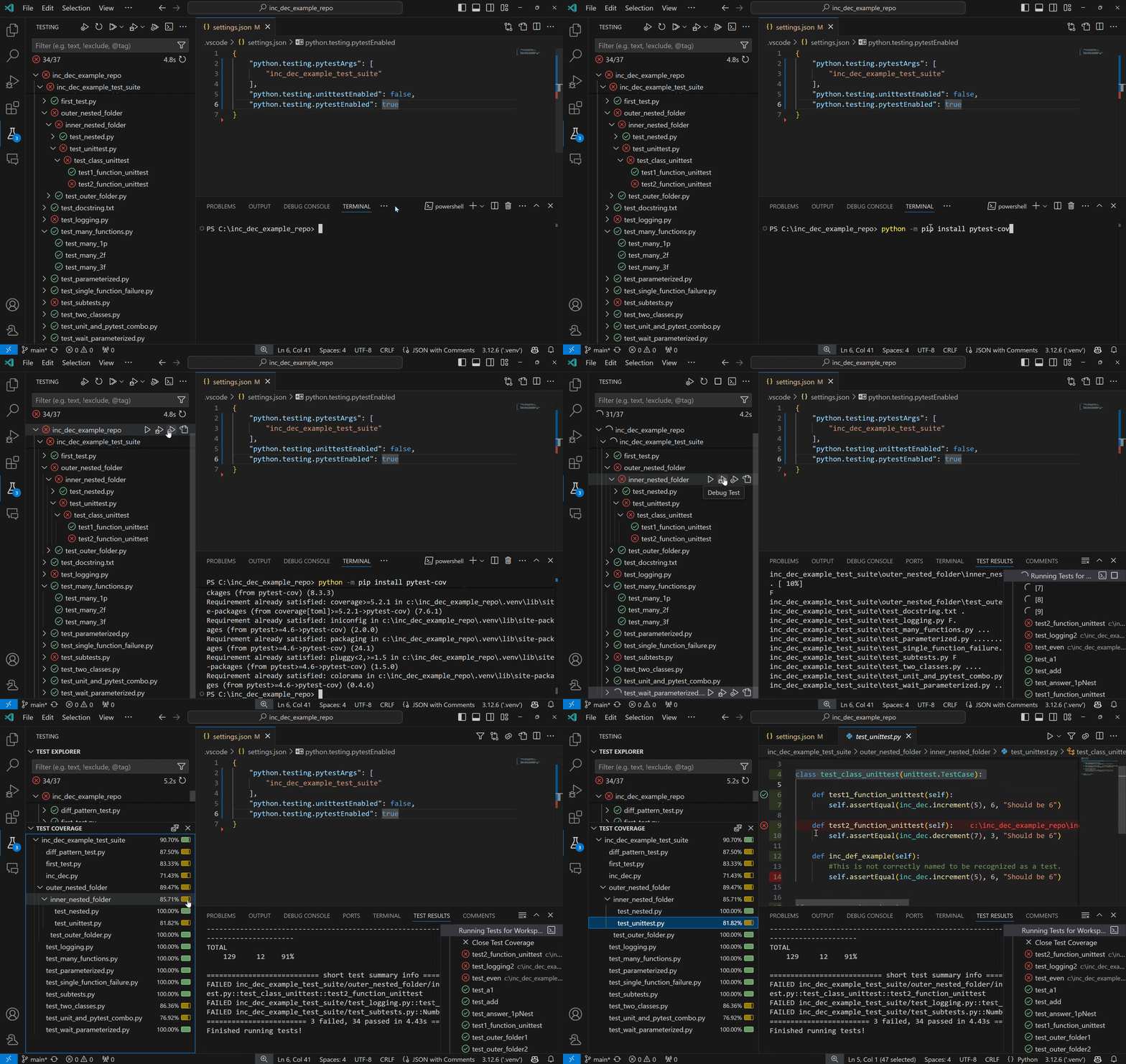
For more information on running Python tests with coverage, see our Python test coverage documentation. For general information on test coverage, see VS Code’s Test Coverage documentation.
Default Python problem matcher
We are excited to announce support for one of our longest request features: there is now a default Python problem matcher! Aiming to simplifying issue tracking in your Python code and offering more contextual feedback, a problem matcher scans the task’s output for errors and warnings and displays them in the Problems panel, enhancing your development workflow. To integrate it, add "problemMatcher": "$python" to your tasks in task.json.
Below is an example of a task.json file that uses the default problem matcher for Python:
{
    "version": "2.0.0",
    "tasks": [
        {
            "label": "Run Python",
            "type": "shell",
            "command": "${command:python.interpreterPath}",
            "args": [
                "${file}"
            ],
            "problemMatcher": "$python"
        }
    ]
}
For more information on tasks and problem matchers, visit VS Code’s Tasks documentation.
Pylance language server mode
There’s a new setting python.analysis.languageServerMode that enables you to choose between our current IntelliSense experience or a lightweight one that is optimized for performance. If you don’t require the full breadth of IntelliSense capabilities and prefer Pylance to be as resource-friendly as possible, you can set python.analysis.languageServerMode to light. Otherwise, to continue with the experience you have with Pylance today, you can leave out the setting entirely or explicitly set it to default .
This new functionality overrides the default values of the following settings:
| Setting | light mode |
default mode |
|---|---|---|
| “python.analysis.exclude” | [“**”] | [] |
| “python.analysis.useLibraryCodeForTypes” | false | true |
| “python.analysis.enablePytestSupport” | false | true |
| “python.analysis.indexing” | false | true |
The settings above can still be changed individually to override the default values.
Shell integration in Python terminal REPL
The Python extension now includes a python.terminal.shellIntegration.enabled setting to enable a better terminal experience on MacOS and Linux machines. When enabled, this setting runs a PYTHONSTARTUP script before you launch the Python REPL in the terminal (for example, by typing and entering python), allowing you to leverage terminal shell integrations such as command decorations, re-run command and run recent commands.
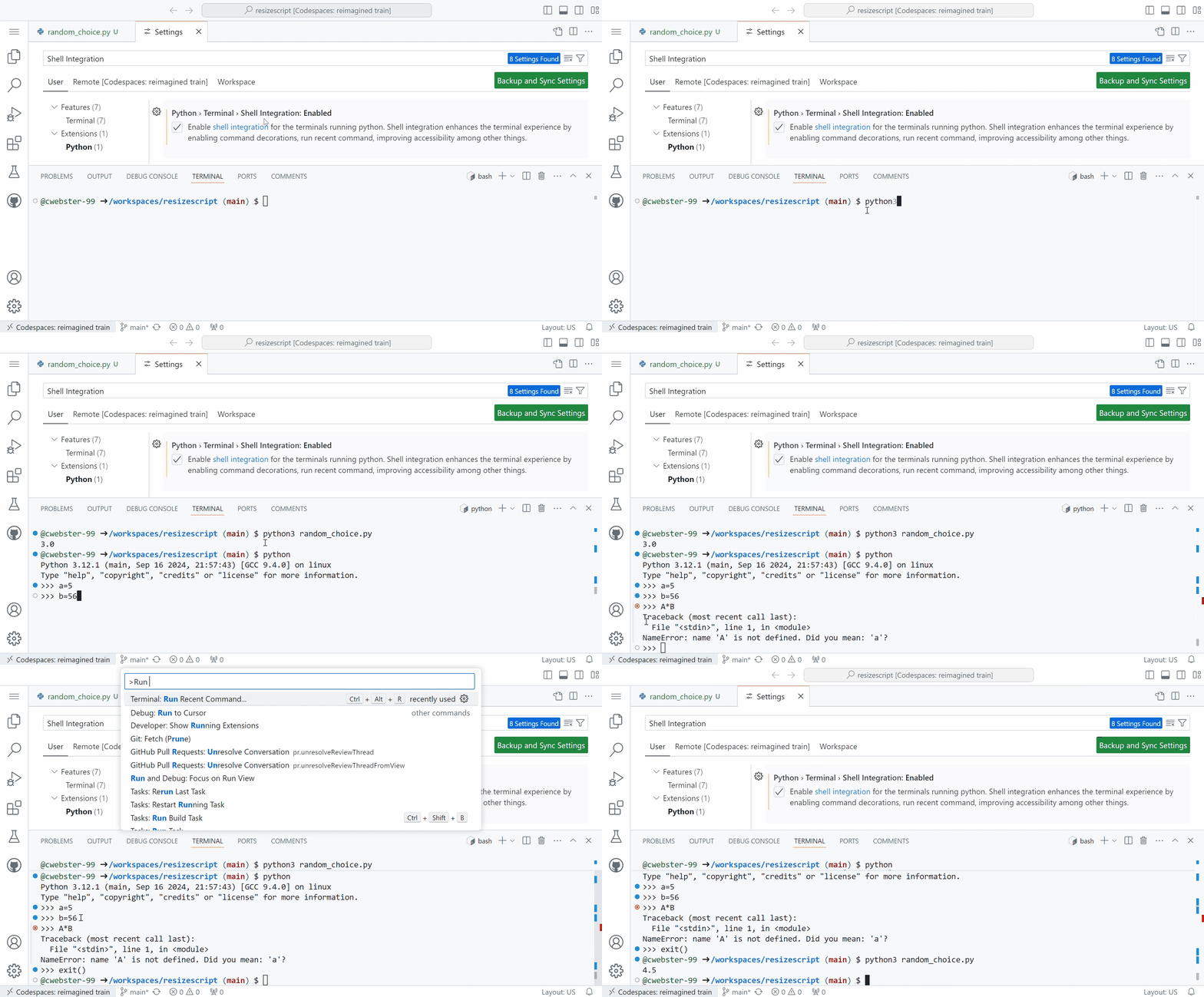
Other Changes and Enhancements
We have also added small enhancements and fixed issues requested by users that should improve your experience working with Python and Jupyter Notebooks in Visual Studio Code. Some notable changes include:
- Experimental Implement Abstract Classes with Copilot Code Action available for GitHub Copilot users using Pylance. Enable by adding
"python.analysis.aiCodeActions": {"implementAbstractClasses": true}in your User settings.json - Fixed duplicate Python executable code when sending code to the Terminal REPL by using
executeCommandrather thansendTextfor the activation command in @vscode#23929
We would also like to extend special thanks to this month’s contributors:
- @edgarrmondragon Add
uv.lockto file associations in vscode-python#23991 - @vishrutss Remove redundant
@typescript-eslint/no-explicit-any suppressionin vscode-python#24091
Try out these new improvements by downloading the Python extension and the Jupyter extension from the Marketplace, or install them directly from the extensions view in Visual Studio Code (Ctrl + Shift + X or ⌘ + ⇧ + X). You can learn more about Python support in Visual Studio Code in the documentation. If you run into any problems or have suggestions, please file an issue on the Python VS Code GitHub page.
The post Python in Visual Studio Code – October 2024 Release appeared first on Python.